
Finds the fights for you
Auto highlights listens for loud moments and watches for fast action and bright skill effects, then lists the best parts. Keep the ones you like and add them to the timeline in one click.
EmpBreak is a free video editor for Windows made for War of Emperium recordings. It scans your footage for the busiest fights and puts them on the timeline, ready for transitions, effects and text.
Free, no watermark. Windows 10 or 11, 64-bit. A free account is needed to download.
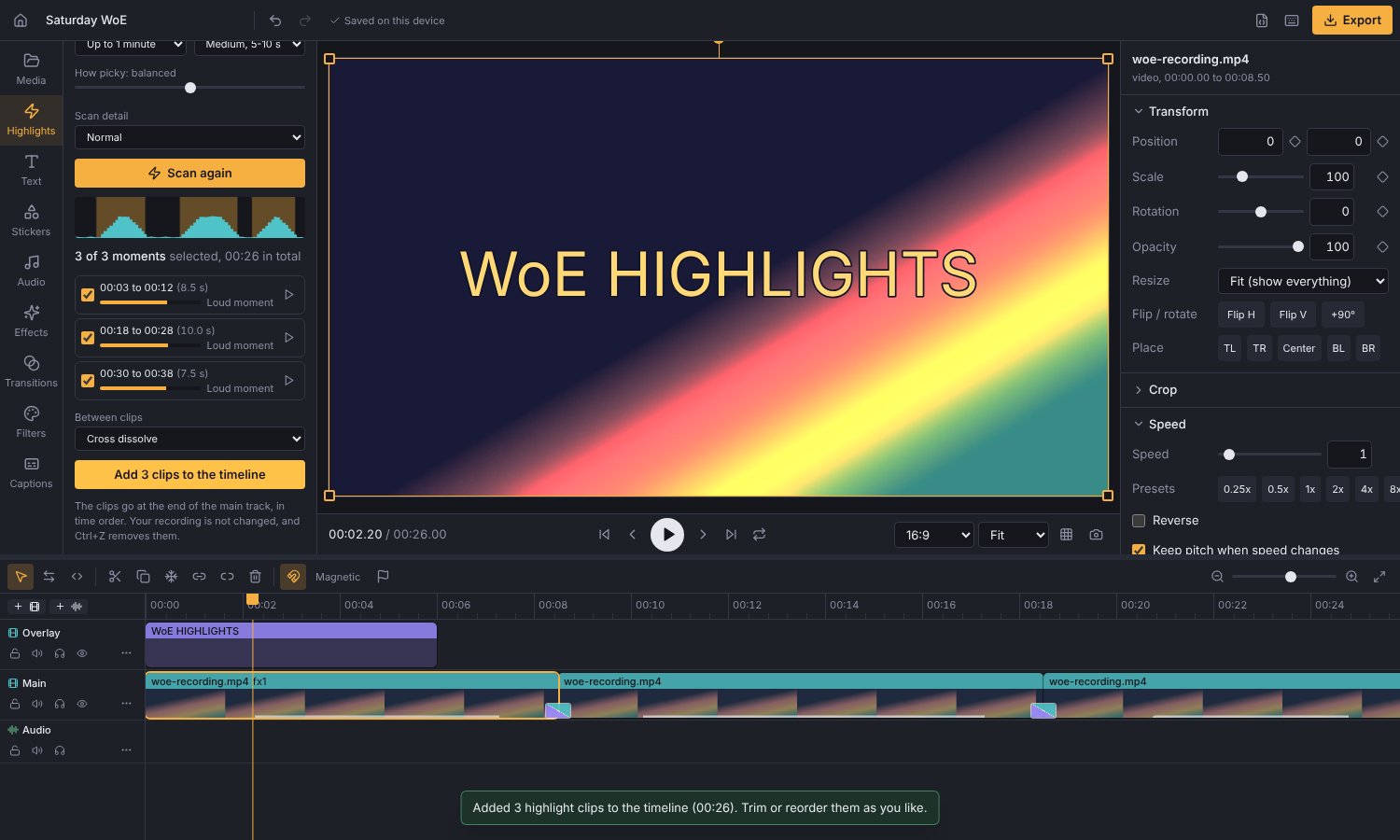
Auto highlights listens for loud moments and watches for fast action and bright skill effects, then lists the best parts. Keep the ones you like and add them to the timeline in one click.
Drag one onto the cut between two clips, the same way you would in a pro editor. Change its length by pulling its edges.
Glitch, camera shake, zoom pulse, glow, VHS, light leaks and more. Put several on one clip and animate them with keyframes.
Cinematic, vintage, neon, moody and others, each with an intensity slider, previewed on your own footage.
Titles with animations, lower thirds, subtitle files, music with automatic ducking under voice, and volume keyframes.
Editing and exporting happen on your computer. Nothing is uploaded, and exports go up to 4K at 60 fps with no watermark.
Enter your email and a password, then open the confirmation link we send you.
Run the installer. Windows may show a "protected your PC" notice the first time: choose More info, then Run anyway.
Open EmpBreak, log in with the same email and password, and import your recording. New versions install themselves.